
Clinic Management Software for Single & Multi-Specialty Clinics
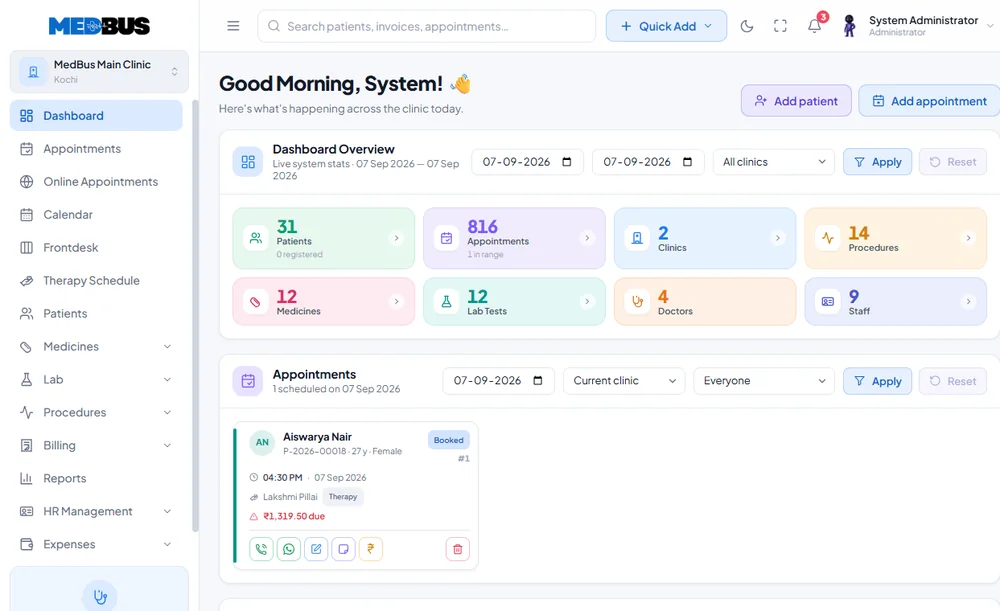
Medbus brings doctors, departments, appointments, patient records, billing, teleconsultation and management reporting into one connected clinic workflow. For a single-specialty practice, it keeps daily administration simple. For a multi-specialty clinic, it adds department-level workflows while giving management one consolidated view.
- Multi-Department Scheduling
- Walk-In & Token Queue
- Doctor Availability Control
- Free personalised demo
- No setup fee
- Onboarding & data migration included

- 60+ clinics trust Medbus
- 17 clinic specialties supported
- 99.9% platform uptime
- 24–48 hrs typical go-live time
What is clinic management software?
Clinic management software connects patient registration, appointments, clinical documentation, billing, communication and reporting so that information moves through one operational workflow instead of separate registers and spreadsheets.
See every moduleCore Medbus modules
- Patient records (EHR)
- Appointments & queue
- Billing & payments
- e-Prescriptions
- Role-based access
- Reports & analytics
What single and multi-specialty clinics need to manage
- Doctor and department scheduling
- Patient registration and longitudinal EHR
- Walk-in, token and appointment management
- Digital prescriptions and clinical templates
- Lab, imaging and document attachments
- Billing, packages, discounts and payment tracking
- Follow-up and reminder workflows
- Doctor, department and branch reporting
How Medbus helps single and multi-specialty clinics
Specialty capabilities built on top of the core modules.
- Department-specific access and workflows
- Cross-specialty referrals
- Consolidated and branch-level dashboards
- Configurable forms and prescription templates
- Patient journey from booking to billing and follow-up

Why single and multi-specialty clinics need specialty-focused clinic software
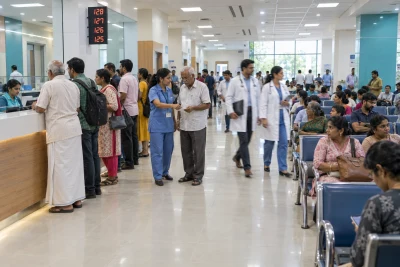
A multi-specialty clinic is several practices sharing one front desk. Each department needs its own calendar, fees and documentation, but the patient should still have one record and management one set of numbers. Software configured for this keeps departments independent without splitting the patient history.
- Online Self-Booking Portal
- SMS & WhatsApp Reminders
- Consolidated Revenue View
- Multi-Branch Management
- Referral Tracking
Powerful Features for Every Specialty. Simple Enough for Every Staff Member.
From dermatology to cardiology — every department runs better with Medbus.
-
Multi-Department Scheduling
Manage appointment slots independently for each specialty department without conflict.
-
Walk-In & Token Queue
Handle walk-in patients with smart token allocation and real-time queue display.
-
Doctor Availability Control
Set working hours, leave days, and max appointments per slot for each doctor.
-
Online Self-Booking Portal
Patients can book, reschedule or cancel appointments 24/7 from any device.
-
SMS & WhatsApp Reminders
Automated reminders via SMS and WhatsApp reduce no-show rates by up to 40%.
-
Consolidated Revenue View
See total clinic revenue across all departments in one real-time dashboard.
-
Multi-Branch Management
Run multiple clinic locations from a single Medbus account with branch-level reports.
-
Referral Tracking
Track inter-department referrals and measure referral conversion rates easily.
-
Insurance & Package Billing
Manage health packages, insurance claims, and OP/IP billing from one billing module.
From first visit to follow-up, in one system
-
One registration
A patient registers once at the front desk and carries the same record into every department.
-
Right doctor, right slot
Each specialist keeps their own calendar, slot rules and consultation fee.
-
Consult and order
Prescriptions, lab and radiology orders are written into the shared record.
-
One bill, one history
Every department's charges land on a single bill, and the next doctor sees the full history.
What changes when you switch to Medbus
-
No duplicate records
One patient, one history — however many departments they visit.
-
Department-wise revenue
See collections and footfall per specialty, not just a clinic total.
-
Clear role access
Each doctor and staff member sees only what their role allows.
-
Shorter front-desk queues
Returning patients are found in seconds, not re-registered.
Explore other specialties
Built for every care provider-
 Polyclinics and Hospital OPDs
High-volume OPD management software for polyclinics and hospital outpatient departments.
Polyclinics and Hospital OPDs
High-volume OPD management software for polyclinics and hospital outpatient departments.
-
 Day-Care Centers and Diagnostic Labs
Lab information system and day-care center management software with result delivery.
Day-Care Centers and Diagnostic Labs
Lab information system and day-care center management software with result delivery.
-
 Therapy & Rehab Centers
Therapy and rehab center management with session tracking and progress notes.
Therapy & Rehab Centers
Therapy and rehab center management with session tracking and progress notes.
-
 Telehealth Providers
End-to-end telehealth software for online consultations, e-prescriptions and payments.
Telehealth Providers
End-to-end telehealth software for online consultations, e-prescriptions and payments.
-
 General / Family Clinic
Simple, powerful clinic software for general practitioners and family medicine clinics.
General / Family Clinic
Simple, powerful clinic software for general practitioners and family medicine clinics.
-
 Pediatric Clinic
Pediatric clinic software with vaccination schedules, growth tracking and parent portals.
Pediatric Clinic
Pediatric clinic software with vaccination schedules, growth tracking and parent portals.
-
 Dermatology Clinic
Dermatology practice management with before/after photo tracking and cosmetic billing.
Dermatology Clinic
Dermatology practice management with before/after photo tracking and cosmetic billing.
-
 Psychiatric & Psychology Clinic
Mental health practice management with secure session notes and client portal.
Psychiatric & Psychology Clinic
Mental health practice management with secure session notes and client portal.
-
 Obstetrics & Gynecology Clinic
OB-GYN clinic software with antenatal care tracking, trimester management and maternity billing.
Obstetrics & Gynecology Clinic
OB-GYN clinic software with antenatal care tracking, trimester management and maternity billing.
-
 Ayurvedic Clinic
Ayurvedic practice management with Prakriti assessment, Panchakarma scheduling and herbal billing.
Ayurvedic Clinic
Ayurvedic practice management with Prakriti assessment, Panchakarma scheduling and herbal billing.
-
 Orthopedic Clinic
Orthopedic clinic software with surgical case management, implant tracking and rehab follow-up.
Orthopedic Clinic
Orthopedic clinic software with surgical case management, implant tracking and rehab follow-up.
-
 Cardiology Clinic
Cardiology clinic software with ECG uploads, cardiac risk scoring and heart specialist EHR.
Cardiology Clinic
Cardiology clinic software with ECG uploads, cardiac risk scoring and heart specialist EHR.
-
 Physiotherapy Clinic
Physiotherapy practice management with SOAP notes, exercise programs and session packages.
Physiotherapy Clinic
Physiotherapy practice management with SOAP notes, exercise programs and session packages.
-
 ENT Clinic
ENT clinic software with audiogram management, surgical case tracking and hearing aid billing.
ENT Clinic
ENT clinic software with audiogram management, surgical case tracking and hearing aid billing.
-
 Urology Clinic
Urology clinic software with procedure tracking, kidney stone management and urological billing.
Urology Clinic
Urology clinic software with procedure tracking, kidney stone management and urological billing.
-
 Gastroenterology Clinic
Gastroenterology practice management with endoscopy report management and GI billing.
Gastroenterology Clinic
Gastroenterology practice management with endoscopy report management and GI billing.
Benefits for doctors and clinic owners
For doctors and clinical teams Less searching, more consistent notes.
- Access relevant patient information from one record instead of searching registers or files.
- Use specialty templates to keep documentation consistent across doctors.
- Schedule appointments and follow-ups from the same workflow as the consultation.
- Reduce duplicate entry between the front desk, clinical and billing teams.
- Keep investigations, prescriptions, procedures and documents on the patient timeline.
For clinic owners and administrators Clear numbers, repeatable processes.
- Monitor patient volumes, appointments, collections and doctor activity in management reports.
- Run consistent processes across doctors, departments and branches.
- Find operational bottlenecks in structured reports rather than scattered spreadsheets.
- See packages, procedures, outstanding payments and repeat visits where those modules are enabled.
- Add users, departments, services or branches without rebuilding the core workflow.

Security, privacy & access control
Medbus protects patient data for single and multi-specialty clinics with controls built into the platform. Using clinic software does not by itself make a practice compliant with healthcare or privacy law — the clinic's own policies still apply. Read the privacy policy
- Role-based access — each staff member sees only what their role allows
- Data stored encrypted on cloud infrastructure
- Audit log of user activity
- Daily automated backups
- Patient records are never shared with integration providers
Frequently asked questions
Single & Multi-Specialty Clinic FAQWhat is clinic management software?
How does Medbus help a multi-specialty clinic?
How does Medbus manage appointments for multi-specialty clinics?
What patient records can a multi-specialty clinic manage in Medbus?
Can Medbus manage billing across departments?
Can Medbus be customized for our existing workflow?
What security and access controls does Medbus provide?
Can we add more doctors, users or branches later?
Last updated . Capabilities marked "where configured" depend on the modules enabled for your clinic.
See Medbus in action for your clinic
Every clinic has a different patient journey. Tell us your clinic type, number of doctors, branches, services and current workflow, and we will demonstrate the modules that matter to single and multi-specialty clinics — from registration and appointments to specialty documentation, billing, reporting and follow-up — before you choose a plan.
- No obligation, no setup fee
- A walkthrough of your specialty
- Reply within one working day
- Free onboarding and migration

Request your free demo
Tell us about your clinic — we'll set up a walkthrough around it.