
Doctor Consultation Software Everything for the Consult on One Screen
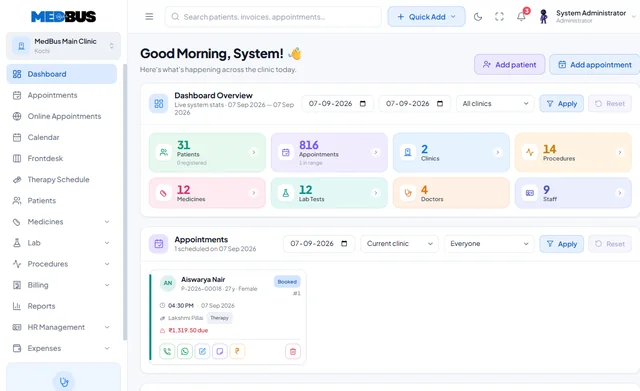
The Medbus doctor module is built around the consultation. Open a patient and their full history, allergies and last prescription are already there; write notes from your specialty's template, prescribe with drug alerts, order tests and book the follow-up — without leaving the screen.
- Full patient history on one screen
- Specialty consultation templates
- e-Prescriptions with drug alerts
- Lab & radiology orders
- Free personalised demo
- No setup fee
- Onboarding & data migration included

What is doctor consultation software?
Doctor consultation software is the doctor's workspace in a clinic system. It shows the patient's history, vitals and reports, captures consultation notes and diagnoses, issues e-prescriptions, orders lab and radiology tests and schedules follow-ups — so the whole consult is documented in one place, legibly and searchably.
Explore the featuresKey takeaways
- History ready before the patient sits down
- Faster, legible prescriptions
- Results that arrive on the record by themselves
- Follow-ups that actually happen
- Your own numbers, any time
What Medbus Doctor Module does for your clinic
8 capabilities, all on the same patient record as the rest of Medbus.
-
Patient history & EHR access
Every visit, prescription, report and document in date order before the patient sits down.
-
Consultation notes & diagnosis
Structured templates per specialty for complaints, examination, diagnosis and plan.
-
e-Prescriptions with drug alerts
Drug search, dosage templates, repeat in one click, with interaction and allergy warnings.
-
Lab & radiology orders
Order tests from the consult; verified results return to the same record.
-
Vitals & clinical flags
Vitals recorded by the nurse appear on screen, with allergies and chronic conditions flagged.
-
Follow-up & recall reminders
Set a review date and the patient is booked and reminded automatically.
-
Your queue at a glance
See who is waiting, who is next and who has been seen — without asking the front desk.
-
Personal analytics
Your own OPD load, new versus returning patients and revenue for any period.
Doctor Module in Medbus, step by step
-
1
Patient called
The next token appears with history and vitals already loaded.
-
2
Consult documented
Notes and diagnosis captured in your specialty template.
-
3
Prescribe & order
e-Prescription with alerts, plus any lab or imaging orders.
-
4
Review booked
Follow-up scheduled and the patient leaves with everything.

Why doctors want a dedicated consult screen
A doctor's time is the clinic's most valuable resource. Hunting for an old file, re-writing a prescription or calling the lab for a result eats into every consultation. A screen built around the consult gives back those minutes, makes prescriptions legible and safer, and keeps every visit documented the same way.
- History ready before the patient sits down
- Faster, legible prescriptions
- Results that arrive on the record by themselves
- Follow-ups that actually happen
- Your own numbers, any time
How Medbus makes Doctor Module better
-
Shorter consults
Templates and repeat prescriptions cut routine typing.
-
Safer prescribing
Allergy and interaction warnings before you sign.
-
Better continuity
Every doctor sees the same complete record.
-
More completed reviews
Follow-ups are booked, not just advised.
How you can customise Doctor Module
Set up for your clinic during onboarding — no custom development, and you can change it later.
-
Your own consultation templates
Fields, sections and default text for each doctor or specialty, built with the custom module builder.
-
Prescription layout & favourites
Your letterhead, signature, registration number and saved medicine sets for common conditions.
-
Order sets
One click to order the tests you always order together, such as a diabetic or antenatal panel.
-
What your screen shows first
Choose which history, vitals and reports appear at the top of the consult.
-
Follow-up rules
Default review intervals by diagnosis or visit type, which you can still change per patient.
Works with the rest of Medbus
One patient record, every module connected- Electronic Medical Records (EMR) EMR (electronic medical records) software replaces paper case files with a digital patient record Learn more
- Laboratory Management A laboratory information system manages a lab's workflow: test orders, sample collection and barcoding, result entry a... Learn more
- Teleconsultation Teleconsultation software lets doctors consult patients remotely by video Learn more
Frequently asked questions
Doctor Module FAQWhat can doctors do in the Medbus doctor module?
Can each doctor use their own consultation template?
Does Medbus check prescriptions for drug interactions?
Can doctors use Medbus on a tablet or phone?
Can a doctor see only their own patients and numbers?
Do doctors need training to use it?
Last updated . Capabilities marked * or "where configured" depend on your plan, region and the modules enabled for your clinic.
See Medbus Doctor Module in action
Book a free walkthrough with a Medbus specialist. Tell us how your clinic works today and we will show you doctor module running on your own services, doctors and branches — along with the modules it connects to — before you choose a plan.
- No obligation, no setup fee
- A walkthrough of your specialty
- Reply within one working day
- Free onboarding and migration

Request your free demo
Tell us about your clinic — we'll set up a walkthrough around it.