
Multi-Branch Clinic Management Software Control Every Branch from One Login
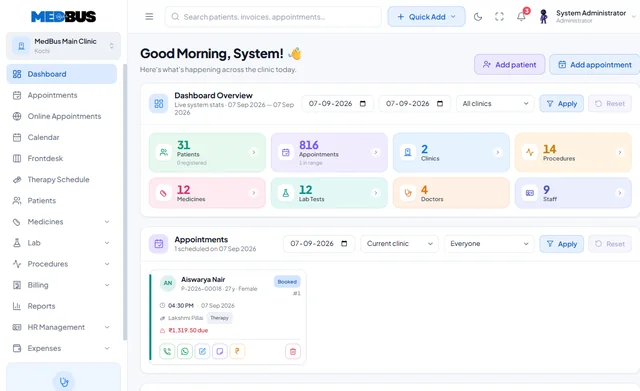
Medbus gives owners and administrators one place to run the clinic or the whole chain: add users and set roles in a minute, switch on the modules each branch needs, control permissions with a full audit log, open a new location on the same system and compare every branch side by side.
- Users & roles in a minute
- Modules per branch
- Permissions & audit logs
- Branch-wise dashboards
- Free personalised demo
- No setup fee
- Onboarding & data migration included

What is multi-branch clinic management software?
Multi-branch clinic management software runs several clinic locations on one system. Each branch keeps its own schedules, staff, billing and stock, while owners manage users, permissions and settings centrally and see consolidated and branch-wise reports.
Explore the featuresKey takeaways
- One login for the whole chain
- Consistent processes in every branch
- New branches live quickly
- Every access change on record
- Branches compared like-for-like
What Medbus Admin, Owner & Multi-Branch does for your clinic
8 capabilities, all on the same patient record as the rest of Medbus.
-
User & role management
Add a receptionist, doctor or manager in a minute with the right permissions.
-
Module activation & configuration
Switch on what each branch needs — pharmacy here, lab there.
-
Permission rules & audit logs
Decide who sees what, and prove who saw or changed what, and when.
-
Branch & department setup
A new location on the same system, with its own doctors, fees and stock.
-
Branch-wise revenue comparison
Every centre side by side on footfall, revenue and collections.
-
Owner dashboards & exports
Consolidated numbers and the board pack, generated for you.
-
Shared patient record
Patients can visit any branch and their history follows them, where you allow it.
-
Central settings
Services, rates and templates managed once and applied across branches.
Admin, Owner & Multi-Branch in Medbus, step by step
-
1
Set up branches
Add locations, departments and doctors.
-
2
Assign people
Users and roles per branch in minutes.
-
3
Switch on modules
Each branch runs the workflows it needs.
-
4
Compare & decide
Consolidated and branch-wise reports for the owner.

Why growing clinics need central control
A second branch often means a second set of spreadsheets, logins and ways of working — and an owner who can no longer see the whole business. Running every branch on one system keeps processes consistent, patient history connected and the numbers comparable.
- One login for the whole chain
- Consistent processes in every branch
- New branches live quickly
- Every access change on record
- Branches compared like-for-like
How Medbus makes Admin, Owner & Multi-Branch better
-
Faster expansion
A new branch is a setup, not a new system.
-
Consistent quality
Same templates and rules everywhere.
-
Tighter control
Permissions and audit logs across branches.
-
Clear performance
See which centre carries the business.
How you can customise Admin, Owner & Multi-Branch
Set up for your clinic during onboarding — no custom development, and you can change it later.
-
Roles & permissions
Your own roles — branch manager, billing lead, consultant — with exactly the access they need.
-
Modules per branch
Switch modules on or off per location as each one grows.
-
Shared or separate data
Decide which records, rates and stock are shared across branches.
-
Owner dashboard
The KPIs you track, on the screen you open first.
-
Approval rules
Discount limits, refunds and purchase approvals by role and branch.
Works with the rest of Medbus
One patient record, every module connected- MIS & Tax Reports Clinic MIS (management information system) reports summarise a clinic's operations and finances for decision-making: p... Learn more
- HR Management Clinic HR software manages a practice's staff: employee records and documents, roles and access, duty rosters and shif... Learn more
- Accounts Management Clinic accounting software records a practice's income and expenses, doctor and staff payouts, vendor payments and ban... Learn more
Frequently asked questions
Admin, Owner & Multi-Branch FAQCan Medbus run multiple clinic branches?
Can owners compare branch performance?
How quickly can we add users and roles?
Does Medbus keep an audit log?
Can patients visit any branch with the same record?
Which plan includes multi-branch management?
Last updated . Capabilities marked * or "where configured" depend on your plan, region and the modules enabled for your clinic.
See Medbus Admin, Owner & Multi-Branch in action
Book a free walkthrough with a Medbus specialist. Tell us how your clinic works today and we will show you admin, owner & multi-branch running on your own services, doctors and branches — along with the modules it connects to — before you choose a plan.
- No obligation, no setup fee
- A walkthrough of your specialty
- Reply within one working day
- Free onboarding and migration

Request your free demo
Tell us about your clinic — we'll set up a walkthrough around it.